

While most people think of VLC Media Player as the digital safety net we can rely on whenever a proprietary media player fails to decode fully some obscure file format, this is at best an under-apprehension of yet another transformative feature. Beneath it’s spartan user interface comes a sophisticated networking stack which allows it to break free of the trappings of ensuring it’s just a playback engine. For power users and home lab geeks, VLC is not only a tool for viewing local files, it is a full network client and server that can deprecate a raft of redundant file sharing and casting applications. By utilising its native support for established protocols such as SMB, FTP and DLNA, users are able to break up the disjointed ecosystems of third-party casting tool chains and subscription-based media servers in favour of a cohesive and unified open-source workflow.
Also read:Microsoft Refines Windows 11 With Long-Awaited UI Fixes
The contemporary media environment is increasingly siloed, requiring media consumers to complete a field of proprietary applications to transfer content between a desktop PC, a mobile device, and a television. Usually this consists of a combination of cloud storage for document transfer, casting apps on mobile-to-pc devices, and heavy-duty media managers such as Plex or Emby for home theater arrangements. VLC eliminates the need for much of this overhead as it effectively becomes a direct link to the file system of the local network. Through its integration “Local Network” allows VLC to mount SMB (Server Message Block) shares which enable a smartphone to browse every video file within a PC with the same low-latency performance as browsing a local file. This is not just for convenience, but this is a technical advantage. Unlike cloud based solutions that add variable latency and bandwidth caps, a direct SMB or NFS connection via VLC makes use of the full throughput of your Wi-Fi 6 or Ethernet hardware, which means 4K HDR bitrates are not compromised.

Also read:Why This New WebKit Browser is the Holy Grail for Power Users and Privacy Seekers
The technical depth of the capabilities of VLC’s networking reaches to its process with FTP and SFTP protocols, which present an even more solid answer for getting to media in different network parts or even remotely. While SMB is optimized for speed using local networks (local area network, LAN), and FTP is robust at a wider network. By deploying a lightweight FTP server on a home work station, a user can use VLC on a mobile device to stream HD content from miles away without having to worry about the heavy metadata scraping or transcoding-overhead required by more modern “media center” applications. This “direct play” philosophy is where VLC is at its best; which is assuming that the client device is powerful enough to handle the codec natively, which almost all modern smartphones are, thus eliminating the need for a powerful power-hungry server to re-encode video on the fly.
Also read:Your Eyes Are Lying To You And This Viral Web Game Proves It
Beyond providing the ability to take in content, VLC is a very capable (if understated) UPnP and DLNA server. In an age when “casting” is often synonymous with Google proprietary Chromecast protocol or Apple’s AirPlay, DLNA has been the end industry standard “lingua franca” of cross brand interoperability. By allowing the Universal Plug and Play (UPnP) capabilities in the VLC’s preferences, the app could then be broadcasted to any capable smart TV or gaming console on the network. This is essentially the same way of making a normal Windows or Linux machine a media hub without the privacy issues or account management of any commercial streaming software. It is a decentralized approach to media management which emphasizes ownership of one’s hardware and data by the user.
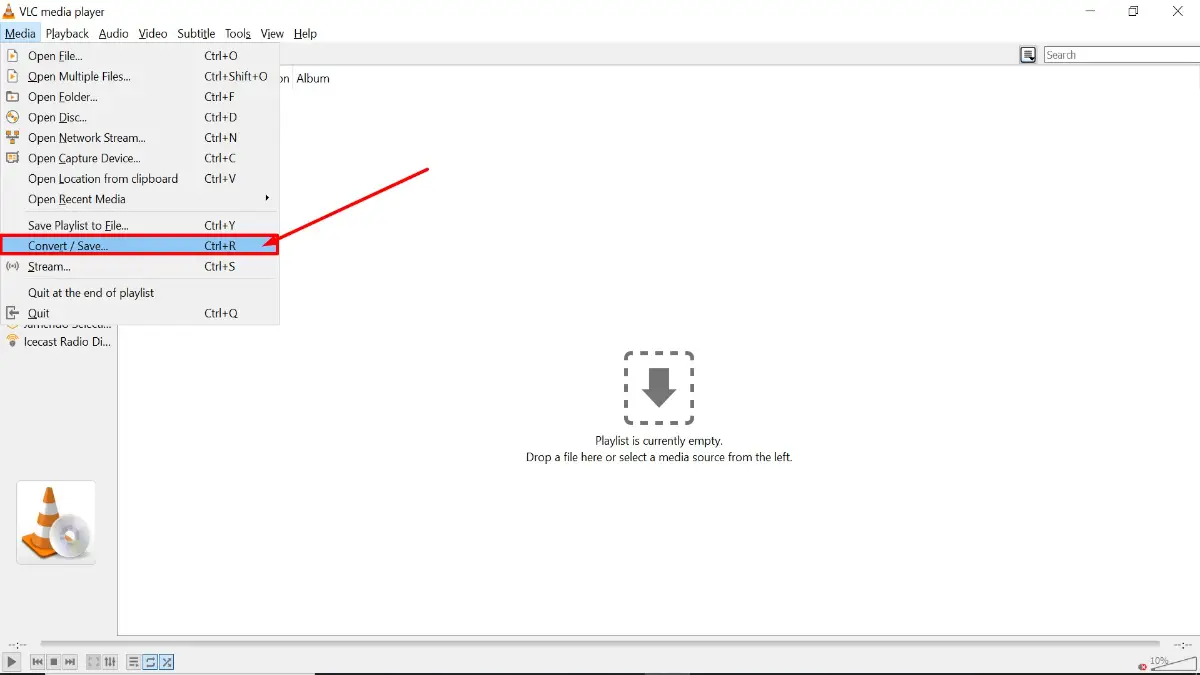
The real utility of the network features of VLC become evident when considering the “Stream” function, a tool that is often buried in the Media menu that most users never click on. This functionality enables a user to take any input – be it a physical DVD, a capture card input or even a file on their local drive – and wrap it into a network stream using protocols such as the http, rtp or rtsp. This practically permits the establishment of a private broadcast station. Whether you are troubleshooting a remote display or just attempting to synchronize your video across a number of devices in a home, VLC’s capability as a source node is unsurpassed in the freeware world. It eliminates the need of special “media bridge” software that is often bundled with hardware but that offers much less flexibility in terms of container and codec selection.
Also read:Your Raspberry Pi Is Getting The One Upgrade You Have Been Waiting For
Transition to a VLC-centric network workflow also offers a huge additional security and performance improvements over the ‘app-for-everything’ workflow. Every third-party utility installed to manage file transfers or casting is a potential attack vector which is a consumer of system interrupts. By bringing these aspects into VLC – which has a transparent and audited codebase – users reduce their digital footprint on the system and bloat the system. AYANEO Pocket DS Secretly Taking Screenshots and Using Massive Data? The Truth Revealed The fact that the application can handle the raw network streams means that it can also replace dedicated surveillance clients by double acting as a viewer for IP security cameras. In a world of ever-growing software complexity and “service-ification”, VLC is a testament to the philosophy of “the Swiss Army Knife”: a tool that is both robust enough to do the job and does not even ask for your username and password, not to track your viewing habits anyway, and offers the technical hooks needed to appropriate the media traffic on your network. For those willing to look beyond the orange cone, VLC isn’t a digital home player, it’s the backbone of a smarter efficient digital home.
Disclaimer: The information provided in this article has been collected from publicly available sources on the Internet. Readers are requested to verify this information with available sources.

