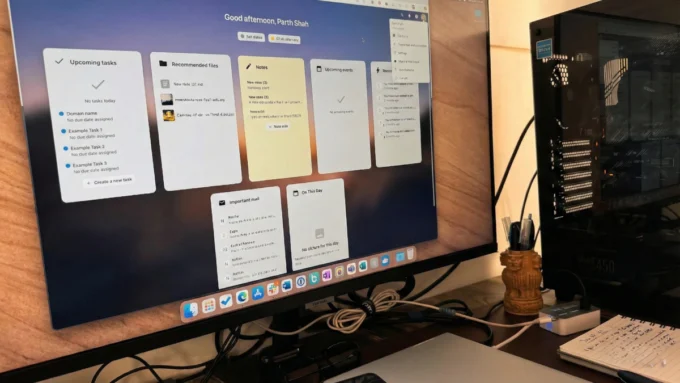
For years, choosing a web browser has felt like a series of frustrating compromises where you always have to give something up to get what you want. If you want the raw speed and incredible battery efficiency of Safari, you usually have to sacrifice the massive library of extensions available on Chromium-based browsers. If you opt for Chrome or Firefox to get those powerful tools, you often end up watching your laptop’s battery percentage plummet while your privacy is poked and prodded by trackers and telemetry. It has been an “either-or” world for a long time, but a relatively new contender called Orion is making a bold claim that you can finally have everything in one place. Developed by the team at Kagi, Orion is built from the ground up on the WebKit engine—the same tech that makes Safari so snappy on Apple devices—but with a massive twist: it supports Chrome and Firefox extensions natively.
Read also:Your Eyes Are Lying To You And This Viral Web Game Proves It
The phrase “pick all three” serves as the foundational philosophy for Orion, referring to the elusive trifecta of native speed, extension compatibility, and absolute privacy. Most browsers today are built on Chromium, which has led to a bit of a monoculture where Google dictates the pace of web development. By choosing WebKit, Orion sidesteps the resource-heavy nature of Chromium, offering a browsing experience that feels lightweight and deeply integrated into the operating system. When you use Orion on a Mac or an iPad, you notice immediately that the scrolling is smoother and the energy impact is significantly lower than what you’d see with a typical third-party browser. This is particularly important for mobile users who want desktop-class power without having to carry a charger everywhere they go.
Read also:Your Raspberry Pi Is Getting The One Upgrade You Have Been Waiting For
What truly sets Orion apart from any other WebKit-based browser is its ability to run extensions from the Chrome Web Store and the Firefox Add-ons gallery. This has long been the “missing link” for users who wanted to leave Safari but couldn’t live without specific productivity tools or niche developer extensions. While Safari has its own extension ecosystem, it is notoriously limited compared to its rivals. Orion bridges this gap by creating a translation layer that allows these extensions to function within a WebKit environment. It isn’t perfect for every single extension yet—some complex ones might still have minor bugs—but the fact that you can install uBlock Origin or specialized SEO tools directly into a Safari-like interface is nothing short of a technical marvel.
Read also:AYANEO Pocket DS Secretly Taking Screenshots and Using Massive Data? The Truth Revealed
Privacy is the third pillar of the Orion experience, and the developers have taken a “zero compromise” approach here. Unlike most mainstream browsers that rely on advertising revenue or data collection to stay afloat, Orion is built on a user-funded model. This means there is no built-in telemetry, no hidden background pings to remote servers, and no interest in tracking your browsing habits to sell you a pair of shoes later. It comes out of the box with aggressive ad and tracker blocking enabled by default. Orion’s philosophy is that if a fingerprinter can’t run, it can’t track you. By preventing these scripts from even executing, the browser provides a level of protection that goes beyond simple cookie blocking, making it a top choice for anyone tired of the constant surveillance of the modern web.
Read also:This Legend of Japanese Horror is Finally Returning to Haunt Your Nightmares
The user interface of Orion is clean and stays out of your way, but it is packed with thoughtful features that power users will appreciate. One standout is “Focus Mode,” which strips away the URL bar and all the clutter, leaving you with just the website content. This is a dream for writers, researchers, or anyone who finds themselves easily distracted by a dozen open tabs. Speaking of tabs, Orion handles them beautifully with support for vertical tabs and tab groups, helping you organize your digital life without feeling overwhelmed. Another clever addition is “Link Preview,” which lets you peek at a website’s content by hovering over a link or using a gesture, so you don’t have to fully commit to opening a new tab just to see if a page is relevant to you.
Under the hood, Orion integrates seamlessly with the rest of the Kagi ecosystem, including Kagi Search and Kagi Assistant. For those who are already fans of Kagi’s ad-free search engine, the browser feels like a natural extension of that workflow. However, even if you don’t use other Kagi products, Orion stands on its own as a premium tool. It even supports iCloud Keychain for passwords and offers synchronization across macOS and iOS, making the transition from Safari almost effortless. The team has also been working hard on versions for Linux and Windows, aiming to bring this “pick all three” philosophy to every major platform by the end of 2026.
Read also:Why Your Windows Task Manager Is Secretly Tricking You Every Day
Despite being a relatively young project compared to giants like Chrome or Firefox, Orion has matured rapidly. It represents a shift in how we think about our relationship with the software we use to access the internet. Instead of being a product used to harvest data, the browser becomes a tool that serves the user. The “user-funded” model is a breath of fresh air in an industry dominated by “free” software that comes with hidden costs. While there is a paid tier called Orion+ that offers early access to features and extra customization, the core browser remains free for everyone to use, proving that you don’t need a multi-billion dollar advertising budget to build a world-class web engine.
Ultimately, Orion is for the person who wants the best of all worlds. It’s for the developer who needs specialized Chrome tools but loves the fluidity of macOS. It’s for the privacy enthusiast who is tired of tweaking hidden settings just to stay anonymous. And it’s for the everyday user who just wants their browser to be fast, clean, and respectful of their time and battery life. By successfully merging the speed of WebKit with the versatility of the wider extension world, Orion isn’t just another browser; it’s a blueprint for what the future of web browsing should look like. It’s a rare piece of software that actually treats its users like customers rather than data points, and in 2026, that is a very powerful thing indeed.
Disclaimer: The information provided in this article has been collected from publicly available sources on the Internet. Readers are requested to verify this information with available sources.