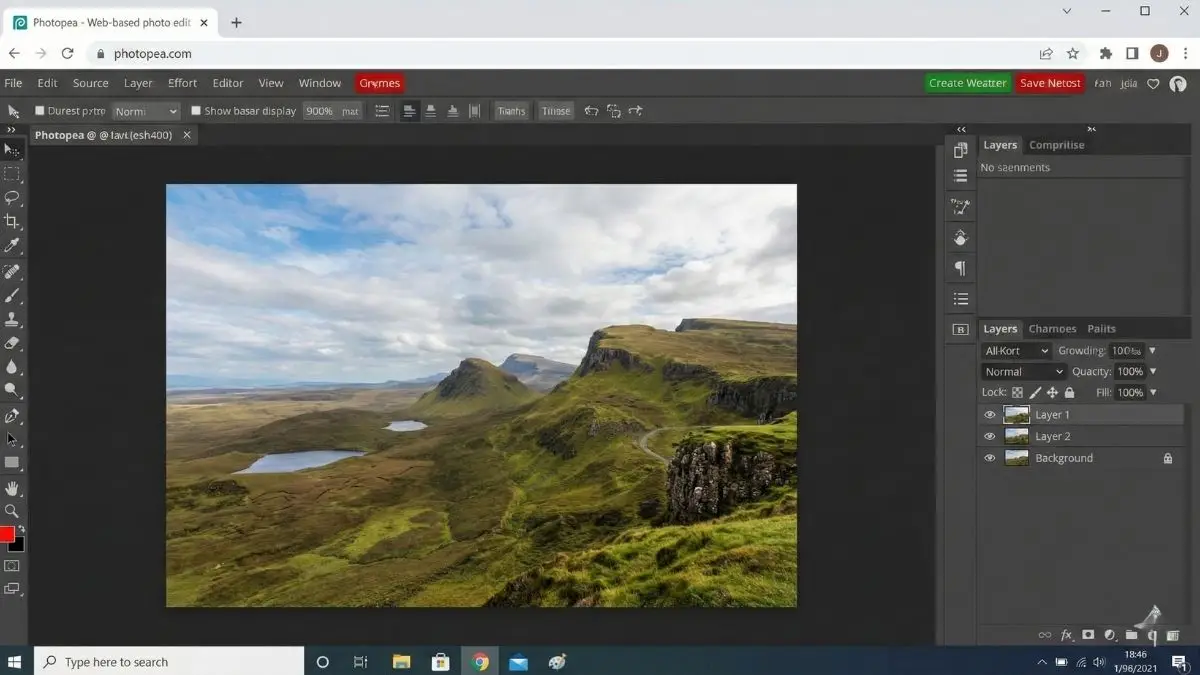
Out there among tools for making art on computers, Adobe Photoshop stands tall – it has shaped how people edit images for years. Most pros in photography or design end up using it, one way or another. But when Adobe switched everything to a pay-every-month system, plenty found themselves locked out. That space gave rise to Photopea, a browser tool flying under the radar yet trusted by countless artists globally. Built solo at first by Ivan Kutskir, it grew beyond expectations. Now it pushes limits, showing web apps can handle tasks once thought impossible online. Not like those so-called free apps stuck with just crop jobs and color tweaks, Photopea handles both pixel and shape design right inside your browser tab. So there is zero need to grab bulky setup files, stress over which operating system you own, or wipe out chunks of storage space just to make it work.
Open the website, and a sense of déjà vu hits straight away. Spend any real time in Photoshop before, that comfort wraps around you fast. Layout matches, toolbar sits where expected, layers panel waits patiently, keyboard tricks work just like Adobe’s main offering. Copying these details closely? That decision fuels rapid adoption. Growth spikes because switching feels nearly effortless. Most people moving from other jobs pick this up right away. Beginners gain abilities that apply straightaway should they choose to work professionally later. Access opens to powerful tools – layer masks, blending options, paths, smart objects, along with Liquify effects. Hard to believe all computing occurs inside your browser, powered by your own machine instead of some far-off server. Speed stays sharp, remains immediate, whether editing large photos or intricate layered artwork.
Getting locked out of design files hits hard when you work solo or are just starting out. A .PSD lands in your inbox, yet no paid Adobe plan means most tools fail right then. Yet here, Photopea slips through that crack like light. Open those layered projects as if the software expected them all along. Edits stick, fonts stay sharp, layers hold their place – no tricks needed. Beyond Photoshop mimicry, it quietly reaches further. Not many free tools open .AI files from Illustrator, connect with .XD and Sketch formats, yet handle RAW images straight from your camera too. That kind of range feels rare when money isn’t involved. Even if you’re using a powerful gaming machine, an older MacBook, or a basic Chromebook handed out at school, everything clicks through one browser link. Suddenly, pro-level design stops being locked behind costly gear or monthly fees. Fair access shows up quietly – just type, press enter, begin.
Truth be told, folks often wonder – how can something like this cost nothing? Here’s what happens behind the scenes. One quiet ad on the side keeps it running. No sneaky upgrades hiding key functions. Every tool opens up without asking for cash. Free means free, not later. Most people ignore the banners. Some choose to pay anyway. Because they appreciate one person working late nights. Money goes toward silence – ads vanish when you upgrade. More room to backtrack too. You get twice as many chances to reverse edits. No locked features hidden behind payment. Just peace and extra steps back. Hard to find this balance elsewhere. Users show up ready to help. They post ideas on Reddit threads he reads every morning. Bugs disappear fast. Sometimes before lunch. Big companies move slower. Built from messages typed at kitchen tables. Grew without investors shouting orders.
Starting fast matters when posting online. Right away, there is a collection of ready-made sizes – pick one that fits YouTube previews, story updates, big banners, or paper flyers. Click into any layout, change what you see, drop in fresh words and pictures, then send off a clean design before too much time passes. Doing things quickly like this makes it stick around desks where output needs polish but not hours spent. Files leave as PNG, JPG, SVG, GIF, also PDF if needed. A single app handles logos and icons now, thanks to vectors being built right in. Who knew cutting out old-school desktop clutter could feel so obvious.
What stands out is how secure things stay here. Since the app lives right inside your browser’s safe zone, pictures never leave your device. All work remains exactly where it began – on your own computer. Privacy matters more than ever, so this setup helps anyone handling private files breathe easier. After the site opens, even if you lose connection, the work keeps going – no stoppage. Your files stay safe while speed depends just on what machine you’re using. With newer tools in browsers – like faster code handling and stronger graphics support – the line fades between Photopea and programs built for computers. One person building something once thought possible only by giant teams shows exactly how much the web has changed over time.
Ahead lies change shaped by how easily people can reach useful tech. Removing cost and skill hurdles lets this platform open doors for anyone wanting to create. Picture a young person far away, using an old computer, yet working with tools just like those at top studios. Trying new things feels safer when there is no invoice waiting or setup headaches slowing progress down. With work shifting more into online spaces every day, Photopea shows what happens when strong programs are truly shared. A tool like this doesn’t come around often – built smart, works fast, stands tall among cluttered alternatives. Skipping it means overlooking a rare find online, one that quietly earns its place in your daily go-to list.
Disclaimer: The information provided in this article has been collected from publicly available sources on the Internet. Readers are requested to verify this information with available sources.
Author

Review Overview
Summary
Vestibulum viverra gravida fringilla. Suspendisse accumsan purus quis augue lobortis quis sagittis
The Pros
Colors Size StyleThe Cons
Expensive Duration quality- Design100%
- Speed80%
- Saving90%
- Features90%